NWP_Query Object ( [query] => Array ( [post_type] => kb [post__not_in] => Array ( [0] => 49638 ) [tax_query] => Array ( [0] => Array ( [taxonomy] => kbtopic [field] => slug [terms] => remote-management-app-notes ) ) [posts_per_page] => 4 [orderby] => rand ) [query_vars] => Array ( [post_type] => kb [post__not_in] => Array ( [0] => 49638 ) [tax_query] => Array ( [0] => Array ( [taxonomy] => kbtopic [field] => slug [terms] => remote-management-app-notes ) ) [posts_per_page] => 4 [orderby] => meta_value_num menu_order [error] => [m] => [p] => 0 [post_parent] => [subpost] => [subpost_id] => [attachment] => [attachment_id] => 0 [name] => [pagename] => [page_id] => 0 [second] => [minute] => [hour] => [day] => 0 [monthnum] => 0 [year] => 0 [w] => 0 [category_name] => [tag] => [cat] => [tag_id] => [author] => [author_name] => [feed] => [tb] => [paged] => 0 [meta_key] => [meta_value] => [preview] => [s] => [sentence] => [title] => [fields] => all [menu_order] => [embed] => [category__in] => Array ( ) [category__not_in] => Array ( ) [category__and] => Array ( ) [post__in] => Array ( ) [post_name__in] => Array ( ) [tag__in] => Array ( ) [tag__not_in] => Array ( ) [tag__and] => Array ( ) [tag_slug__in] => Array ( ) [tag_slug__and] => Array ( ) [post_parent__in] => Array ( ) [post_parent__not_in] => Array ( ) [author__in] => Array ( ) [author__not_in] => Array ( ) [search_columns] => Array ( ) [meta_query] => Array ( [relation] => OR [0] => Array ( [key] => mkb_tax_order_6053 [compare] => EXISTS ) [1] => Array ( [key] => mkb_tax_order_6053 [compare] => NOT EXISTS ) ) [order] => ASC [ignore_sticky_posts] => [suppress_filters] => [cache_results] => 1 [update_post_term_cache] => 1 [update_menu_item_cache] => [lazy_load_term_meta] => 1 [update_post_meta_cache] => 1 [nopaging] => [comments_per_page] => 50 [no_found_rows] => [taxonomy] => kbtopic [term] => remote-management-app-notes ) [tax_query] => WP_Tax_Query Object ( [queries] => Array ( [0] => Array ( [taxonomy] => kbtopic [terms] => Array ( [0] => remote-management-app-notes ) [field] => slug [operator] => IN [include_children] => 1 ) ) [relation] => AND [table_aliases:protected] => Array ( [0] => wp_term_relationships ) [queried_terms] => Array ( [kbtopic] => Array ( [terms] => Array ( [0] => remote-management-app-notes ) [field] => slug ) ) [primary_table] => wp_posts [primary_id_column] => ID ) [meta_query] => WP_Meta_Query Object ( [queries] => Array ( [0] => Array ( [key] => mkb_tax_order_6053 [compare] => EXISTS ) [1] => Array ( [key] => mkb_tax_order_6053 [compare] => NOT EXISTS ) [relation] => OR ) [relation] => OR [meta_table] => wp_postmeta [meta_id_column] => post_id [primary_table] => wp_posts [primary_id_column] => ID [table_aliases:protected] => Array ( [0] => wp_postmeta [1] => mt1 ) [clauses:protected] => Array ( [wp_postmeta] => Array ( [key] => mkb_tax_order_6053 [compare] => EXISTS [compare_key] => = [alias] => wp_postmeta [cast] => CHAR ) [mt1] => Array ( [key] => mkb_tax_order_6053 [compare] => NOT EXISTS [compare_key] => = [alias] => mt1 [cast] => CHAR ) ) [has_or_relation:protected] => 1 ) [date_query] => [queried_object] => WP_Term Object ( [term_id] => 6053 [name] => Remote Management Application Notes [slug] => remote-management-app-notes [term_group] => 0 [term_taxonomy_id] => 6053 [taxonomy] => kbtopic [description] => [parent] => 6052 [count] => 8 [filter] => raw [term_order] => 1 ) [queried_object_id] => 6053 [request] => SELECT SQL_CALC_FOUND_ROWS wp_posts.ID FROM wp_posts LEFT JOIN wp_term_relationships ON (wp_posts.ID = wp_term_relationships.object_id) LEFT JOIN wp_postmeta ON ( wp_posts.ID = wp_postmeta.post_id ) LEFT JOIN wp_postmeta AS mt1 ON ( wp_posts.ID = mt1.post_id AND mt1.meta_key = 'mkb_tax_order_6053' ) WHERE 1=1 AND wp_posts.ID NOT IN (49638) AND ( wp_term_relationships.term_taxonomy_id IN (6053) ) AND ( wp_postmeta.meta_key = 'mkb_tax_order_6053' OR mt1.post_id IS NULL ) AND ((wp_posts.post_type = 'kb' AND (wp_posts.post_status = 'publish' OR wp_posts.post_status = 'acf-disabled'))) GROUP BY wp_posts.ID ORDER BY wp_postmeta.meta_value+0 ASC, wp_posts.menu_order ASC LIMIT 0, 4 [posts] => Array ( [0] => WP_Post Object ( [ID] => 37844 [post_author] => 18 [post_date] => 2024-10-09 20:16:44 [post_date_gmt] => 2024-10-10 03:16:44 [post_content] => Remote Management is a feature available through AiphoneCloud. To use Remote Management, 1 IXGW-(T)GW is required. Sites using Remote Management support a single IXGW-(T)GW, while sites using IXG Support Tool can use up to 99. This chart shows which stations can be programmed with AiphoneCloud, and which ones requires IX or IXG Support Tool.

ü

Currently Supported

w

Support Pending Future Updates

û

Not Supported

IX Support Tool

IXG Support Tool

AiphoneCloud

IXG Series


IXG-MK

û

ü

ü

IXG-DM7-HID(A)

û

ü

ü

IXG-2C7(-L)

û

ü

ü

IXGW-LC

û

ü

ü

IXGW-LC-RY20

û

ü

û

IXGW-(T)GW

û

ü

ü

Current IX Series


IX-MV7

ü

ü

ü

IX-SOFT

ü

ü

w

IX-RS

ü

ü

ü

IX-DV(F)

ü

ü

ü

IX-DVF-RA

ü

ü

ü

IX-DVM

ü

ü

ü

IX-EA

ü

ü

ü

IX-NVP

ü

ü

ü

IX-SS-2G

ü

ü

ü

IX-SSA

ü

ü

ü

IX-SSA-(*RA)

ü

ü

ü

IXW-MA(A)

ü

ü

ü

Discontinued IX


IX-MV

ü

û

û

IX-DA

ü

ü

û

IX-BA

ü

ü

û

RY-IP44*

ü

ü

û

IX-1AS, IX-10AS*

ü

û

û

IX-PA*

ü

û

û

* Requires additional in-browser programming


  [post_title] => IX | IXG Series Hardware Compatible with Remote Management [post_excerpt] => [post_status] => publish [comment_status] => open [ping_status] => open [post_password] => [post_name] => aiphonecloud-vs-support-tool-station-support [to_ping] => [pinged] => [post_modified] => 2025-10-01 09:54:03 [post_modified_gmt] => 2025-10-01 16:54:03 [post_content_filtered] => [post_parent] => 0 [guid] => https://aiphone.local/kb/aiphonecloud-vs-support-tool-station-support/ [menu_order] => 0 [post_type] => kb [post_mime_type] => [comment_count] => 0 [filter] => raw ) [1] => WP_Post Object ( [ID] => 37849 [post_author] => 18 [post_date] => 2024-10-09 21:16:59 [post_date_gmt] => 2024-10-10 04:16:59 [post_content] => Remote Management is a feature available through AiphoneCloud. To use Remote Management, 1 IXGW-(T)GW is required. Sites using Remote Management support a single IXGW-(T)GW, while sites using IXG Support Tool can use up to 99. This chart shows which stations can be programmed with AiphoneCloud, and which ones requires IX or IXG Support Tool.

IXG Support Tool

AiphoneCloud

IXGW-LC(-RY20)

ü

ü


IXGW-LC-RY20

ü

û

ü

Currently Supported

IX-SOFT

ü

w

w

Support Pending Future Updates

IX-MV

û

û

û

Not Supported

IX-DA

ü

û

IX-BA

ü

û

RY-IP44*

ü

û

IX-1AS, IX-10AS*

û

û

IX-PA*

û

û

* Requires additional in-browser programming


Feature Compatibility List

IXG Support Tool

AiphoneCloud

New System Wizard

û

ü

Add Device Wizard

û

ü

Status Dashboard

û

ü

Update Firmware

ü

ü

ü

Currently Supported

Call Destinations

ü

ü

w

Support Pending Future Updates

Address Book Configuration

ü

ü

û

Support Not Planned at this time

Absent and Delay Transfer

ü

ü

Schedule Transfer

ü

û

Chime Schedule

ü

û

Speed Dial Configuration

ü

ü

Paging Groups

ü

w

SIP Integration

ü

ü

Upload Custom Sound Files

ü

w

Upload Custom Images

ü

w

Export QR Codes for app registration

ü

ü

Email QR Codes to tenants for app registration

û

ü

Configure IXG-DM7 Access Codes

ü

ü

IP Camera Integration ü ü

For additional information about specific features, contact tech@aiphone.com

[post_title] => Features Supported by Remote Management [post_excerpt] => [post_status] => publish [comment_status] => open [ping_status] => open [post_password] => [post_name] => aiphonecloud-vs-support-tool-features [to_ping] => [pinged] => [post_modified] => 2025-10-29 12:19:21 [post_modified_gmt] => 2025-10-29 19:19:21 [post_content_filtered] => [post_parent] => 0 [guid] => https://aiphone.local/kb/aiphonecloud-vs-support-tool-features/ [menu_order] => 0 [post_type] => kb [post_mime_type] => [comment_count] => 0 [filter] => raw ) [2] => WP_Post Object ( [ID] => 47509 [post_author] => 18 [post_date] => 2025-06-13 09:08:51 [post_date_gmt] => 2025-06-13 16:08:51 [post_content] =>

This guide goes over creating an account in the IXG Portal, and other initial setup steps.

[post_title] => IXG Portal Management Guide [post_excerpt] => [post_status] => publish [comment_status] => closed [ping_status] => closed [post_password] => [post_name] => ixg-portal-management-guide [to_ping] => [pinged] => [post_modified] => 2025-10-07 08:53:25 [post_modified_gmt] => 2025-10-07 15:53:25 [post_content_filtered] => [post_parent] => 0 [guid] => https://www.aiphone.com/?post_type=kb&p=47509 [menu_order] => 0 [post_type] => kb [post_mime_type] => [comment_count] => 0 [filter] => raw ) [3] => WP_Post Object ( [ID] => 46144 [post_author] => 18 [post_date] => 2025-04-14 10:47:36 [post_date_gmt] => 2025-04-14 17:47:36 [post_content] =>

This app note covers situations where a local DHCP server is not available during initial setup, which can prevent the IXGW-TGW from connecting to AiphoneCloud.

[post_title] => Configuring an IXGW-TGW for Remote Management on a Network without DHCP [post_excerpt] => [post_status] => publish [comment_status] => closed [ping_status] => closed [post_password] => [post_name] => configuring-an-ixgw-tgw-for-remote-management-on-a-network-without-dhcp [to_ping] => [pinged] => [post_modified] => 2025-12-03 14:21:47 [post_modified_gmt] => 2025-12-03 22:21:47 [post_content_filtered] => [post_parent] => 0 [guid] => https://www.aiphone.com/?post_type=kb&p=46144 [menu_order] => 0 [post_type] => kb [post_mime_type] => [comment_count] => 0 [filter] => raw ) ) [post_count] => 4 [current_post] => -1 [before_loop] => 1 [in_the_loop] => [post] => WP_Post Object ( [ID] => 37844 [post_author] => 18 [post_date] => 2024-10-09 20:16:44 [post_date_gmt] => 2024-10-10 03:16:44 [post_content] => Remote Management is a feature available through AiphoneCloud. To use Remote Management, 1 IXGW-(T)GW is required. Sites using Remote Management support a single IXGW-(T)GW, while sites using IXG Support Tool can use up to 99. This chart shows which stations can be programmed with AiphoneCloud, and which ones requires IX or IXG Support Tool.

ü

Currently Supported

w

Support Pending Future Updates

û

Not Supported

IX Support Tool

IXG Support Tool

AiphoneCloud

IXG Series


IXG-MK

û

ü

ü

IXG-DM7-HID(A)

û

ü

ü

IXG-2C7(-L)

û

ü

ü

IXGW-LC

û

ü

ü

IXGW-LC-RY20

û

ü

û

IXGW-(T)GW

û

ü

ü

Current IX Series


IX-MV7

ü

ü

ü

IX-SOFT

ü

ü

w

IX-RS

ü

ü

ü

IX-DV(F)

ü

ü

ü

IX-DVF-RA

ü

ü

ü

IX-DVM

ü

ü

ü

IX-EA

ü

ü

ü

IX-NVP

ü

ü

ü

IX-SS-2G

ü

ü

ü

IX-SSA

ü

ü

ü

IX-SSA-(*RA)

ü

ü

ü

IXW-MA(A)

ü

ü

ü

Discontinued IX


IX-MV

ü

û

û

IX-DA

ü

ü

û

IX-BA

ü

ü

û

RY-IP44*

ü

ü

û

IX-1AS, IX-10AS*

ü

û

û

IX-PA*

ü

û

û

* Requires additional in-browser programming


  [post_title] => IX | IXG Series Hardware Compatible with Remote Management [post_excerpt] => [post_status] => publish [comment_status] => open [ping_status] => open [post_password] => [post_name] => aiphonecloud-vs-support-tool-station-support [to_ping] => [pinged] => [post_modified] => 2025-10-01 09:54:03 [post_modified_gmt] => 2025-10-01 16:54:03 [post_content_filtered] => [post_parent] => 0 [guid] => https://aiphone.local/kb/aiphonecloud-vs-support-tool-station-support/ [menu_order] => 0 [post_type] => kb [post_mime_type] => [comment_count] => 0 [filter] => raw ) [comment_count] => 0 [current_comment] => -1 [found_posts] => 7 [max_num_pages] => 2 [max_num_comment_pages] => 0 [is_single] => [is_preview] => [is_page] => [is_archive] => 1 [is_date] => [is_year] => [is_month] => [is_day] => [is_time] => [is_author] => [is_category] => [is_tag] => [is_tax] => 1 [is_search] => [is_feed] => [is_comment_feed] => [is_trackback] => [is_home] => [is_privacy_policy] => [is_404] => [is_embed] => [is_paged] => [is_admin] => [is_attachment] => [is_singular] => [is_robots] => [is_favicon] => [is_posts_page] => [is_post_type_archive] => 1 [query_vars_hash:WP_Query:private] => 96bbc19833de06d8c44d177a415d88ab [query_vars_changed:WP_Query:private] => 1 [thumbnails_cached] => [allow_query_attachment_by_filename:protected] => [stopwords:WP_Query:private] => [compat_fields:WP_Query:private] => Array ( [0] => query_vars_hash [1] => query_vars_changed ) [compat_methods:WP_Query:private] => Array ( [0] => init_query_flags [1] => parse_tax_query ) [query_cache_key:WP_Query:private] => wp_query:8c431739fa4e71e5dac5dfc189c02618 )

Linking IXG Portal and Remote Management Accounts

Overview

Dealer and Property Management branches in AiphoneCloud are required to link a primary IXG Portal account. This streamlines access for branch members when performing tasks in Remote Management and SIM Billing that require interaction with the IXG Portal. Linking an IXG Portal account is mandatory, and Remote Management and SIM Billing will not be accessible until this step is performed. 

The Branch Admin designates an IXG Portal account to be automatically used by any branch member accessing SIM Billing or Remote Management. Branch members only need to log into AiphoneCloud using their unique account. This ensures uninterrupted access to important functionality, like creating new sites, mobile app registration, and tenant management. 

IXG SupportTool requires each user to log in with their company’s shared IXG Portal account to create a system using IXG Mobile or the IXGW-TGW SIM connection. AiphoneCloud removes this reliance on shared credentials. 

Note for Branches with Multiple Existing IXG Portal Accounts

Complete the steps below as normal, choosing a single IXG Portal account that will be used going forward. After linking an account, authorize additional IXG Portal accounts for consolidation. Aiphone will migrate any Sites from these additional accounts to the primary account.

Note for New Branches without an Existing IXG Portal Account

If your organization has not installed an IXGW-TGW Gateway or used AiphoneCloud, follow the prompts to create an IXG Portal account for your branch. 

Note for Companies with Multiple Branches 

An IXG Portal account may be shared by multiple Branches in the same Company. Have an administrator from each branch link the same account.  

How to Link Existing IXG Portal and Remote Management Accounts

Before proceeding, communicate with other administrators. Designate which branch administrator will handle the linking process. If there are multiple IXG Portal accounts in use by the branch, decide in advance which will be used going forward as the Primary account. 

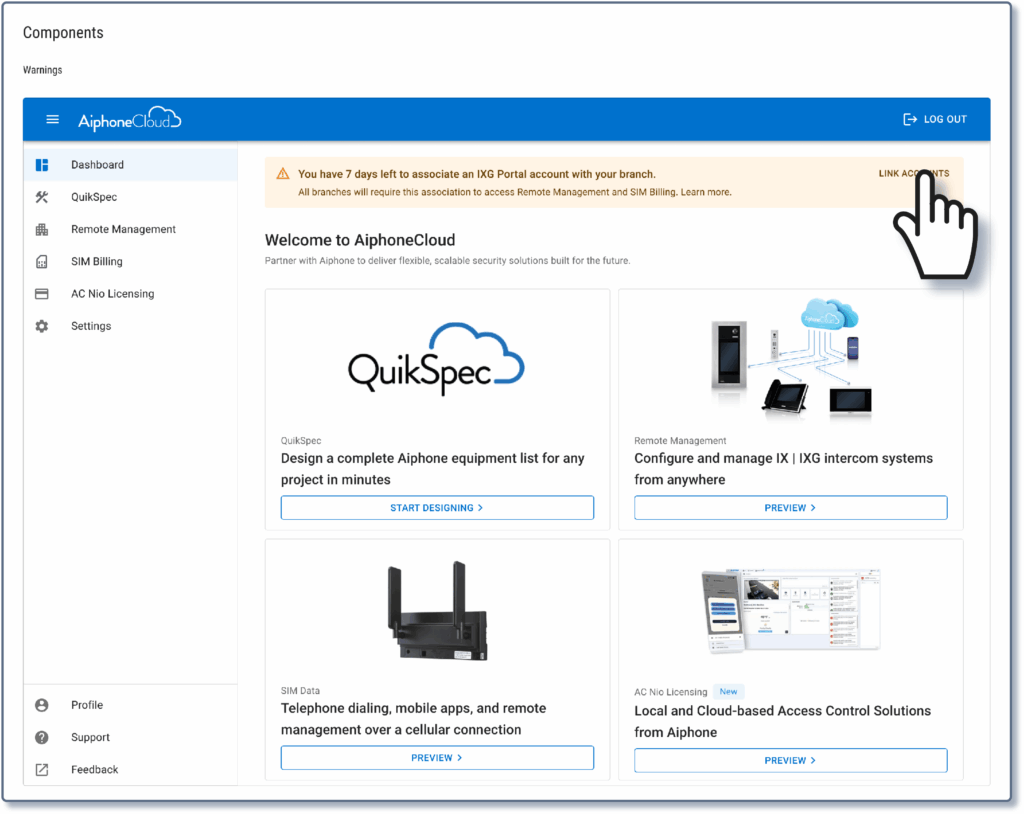
Have the designated branch administrator log into AiphoneCloud. There will be a prompt at the top of the page inviting you to link the IXG Portal account. Click Link Accounts.  
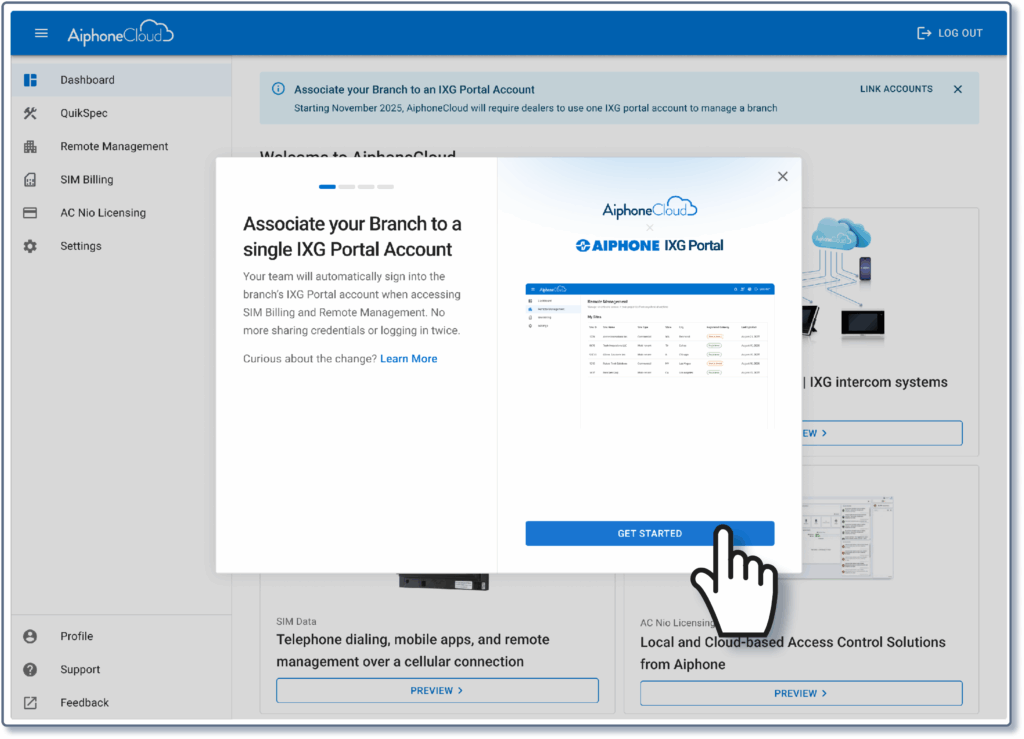
A prompt will appear to associate the user’s branch to a single IXG Portal account. Click Get Started.
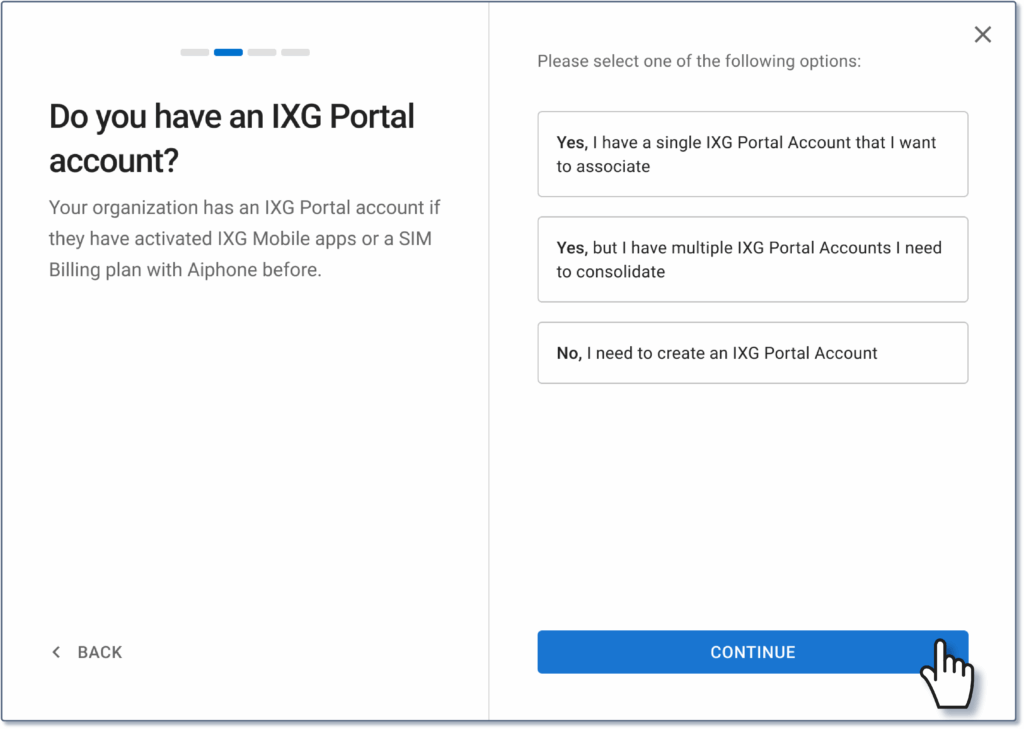
A message will appear asking if the is already an IXG Portal account in place, multiple IXG Portal accounts, or if an account needs to be created. Select the appropriate response, click Continue, then follow the prompts to log into the primary account or to create a new account.
Once the log in is completed, there will be a prompt to confirm that the accounts that will be linked. Click Confirm.

If there are multiple IXG Portal accounts to be consolidated, a prompt will appear to enter the credentials for the other accounts. If that is the case, fill out the information and click Verify Accounts.

Once the accounts are verified, click Merge.

Whatever type of account was created, the process will be finished. Click Back to Dashboard to complete the process.

Transform Your Security Today

Connect with our local experts for product questions, demos, and assistance in designing your ideal security solution.

Contact Us