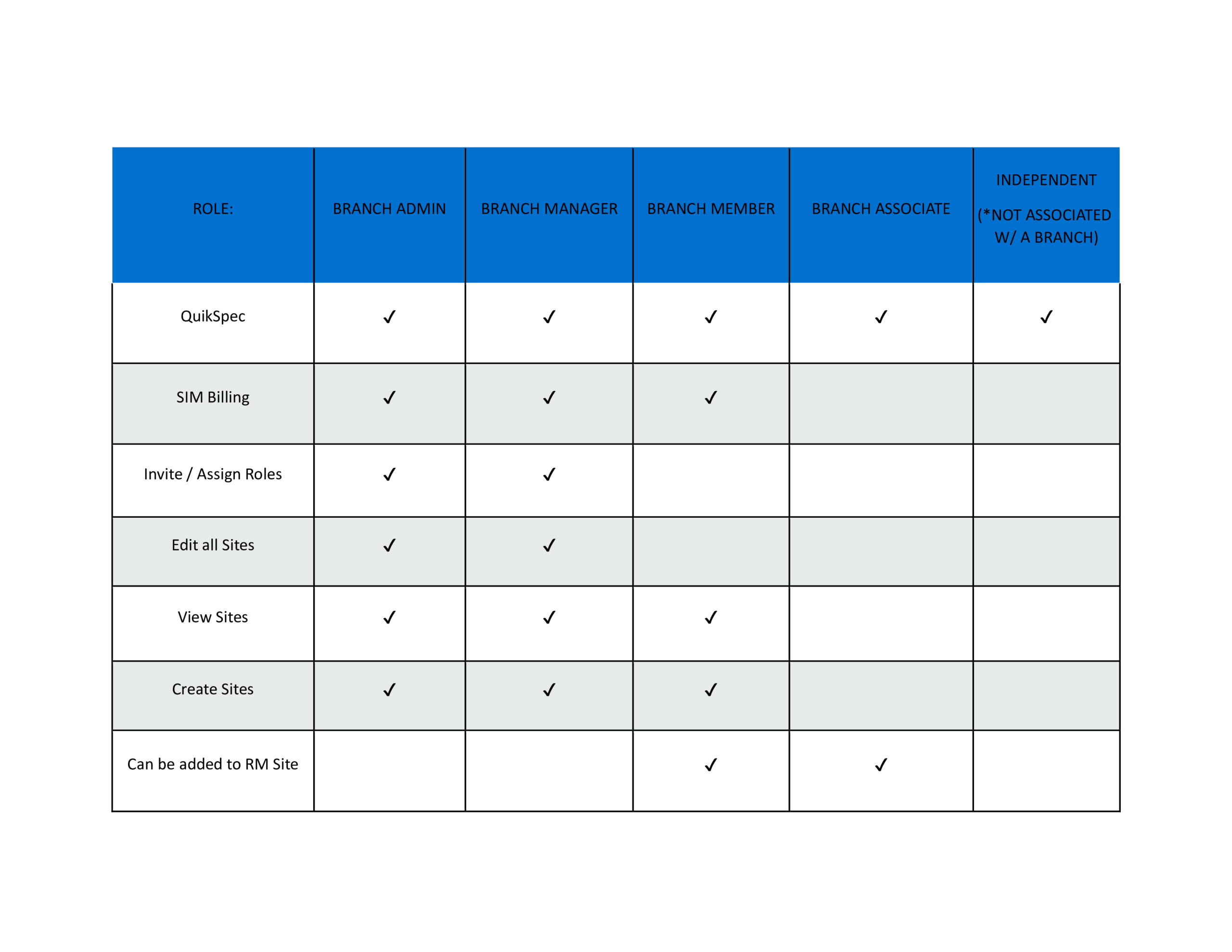
 [post_title] => Branch Permissions in AiphoneCloud
[post_excerpt] =>
[post_status] => publish
[comment_status] => open
[ping_status] => open
[post_password] =>
[post_name] => branch-permissions-in-aiphonecloud
[to_ping] =>
[pinged] =>
[post_modified] => 2025-03-13 10:25:27
[post_modified_gmt] => 2025-03-13 17:25:27
[post_content_filtered] =>
[post_parent] => 0
[guid] => https://aiphone.local/kb/branch-permissions-in-aiphonecloud/
[menu_order] => 0
[post_type] => kb
[post_mime_type] =>
[comment_count] => 0
[filter] => raw
)
[3] => WP_Post Object
(
[ID] => 37861
[post_author] => 18
[post_date] => 2024-10-29 15:08:11
[post_date_gmt] => 2024-10-29 22:08:11
[post_content] =>
[post_title] => Branch Permissions in AiphoneCloud
[post_excerpt] =>
[post_status] => publish
[comment_status] => open
[ping_status] => open
[post_password] =>
[post_name] => branch-permissions-in-aiphonecloud
[to_ping] =>
[pinged] =>
[post_modified] => 2025-03-13 10:25:27
[post_modified_gmt] => 2025-03-13 17:25:27
[post_content_filtered] =>
[post_parent] => 0
[guid] => https://aiphone.local/kb/branch-permissions-in-aiphonecloud/
[menu_order] => 0
[post_type] => kb
[post_mime_type] =>
[comment_count] => 0
[filter] => raw
)
[3] => WP_Post Object
(
[ID] => 37861
[post_author] => 18
[post_date] => 2024-10-29 15:08:11
[post_date_gmt] => 2024-10-29 22:08:11
[post_content] => This guide is intended for end users and installers who activated their AC Nio software license on the original licensing portal, https://auth.acnio-license.aiphone.com/. This website has been deprecated in favor of fuller integration on AiphoneCloud, available at https://aiphone.cloud. If a license was originally registered on AiphoneCloud, no action needs to be taken.
Preparation
Navigate to https://aiphone.cloud. Log in with an existing account, or register a new one.
If the account is newly created or the account has not already been given Dealer status, contact cloudadmin@aiphone.com to become a Dealer. This email will be sent to the appropriate Aiphone employees and will be processed as soon as possible, but may take until the next business day.
Once the account has been granted Dealer status, navigate to AC Nio Licensing on the side menu. Click on the link to download the newest version of the AC Nio software.

Use the downloaded software package up update AC Nio. The instructions are in Chapter 2 of the AC Nio Settings Manual. This can be accessed from AC Nio on the side menu under System, Documentation.

Renewing the License
Navigate back to AiphoneCloud. Under AC Nio Licensing, click + Deploy New License.

On the next page, choose a local deployment and click Continue.
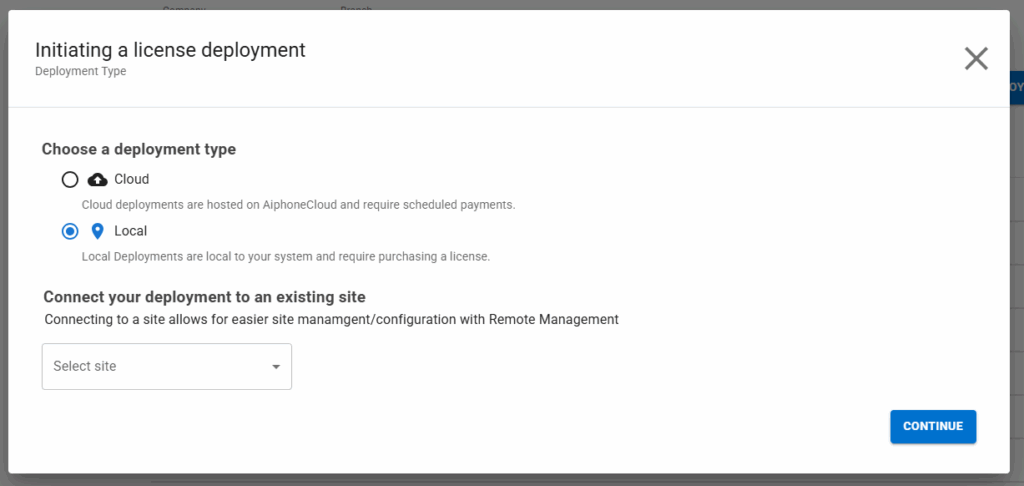
Go through the process of creating the new deployment, including entering the site information and payment information. Select a new license agreement. Copy the displayed account number.
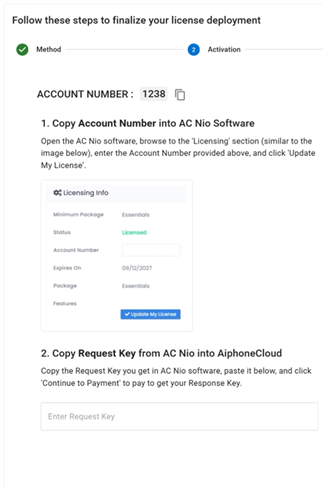
Navigate back to AC Nio, though leave AiphoneCloud open in another window. In AC Nio, navigate to Administration, Licensing on the side menu. Enter the account number from AiphoneCloud and click Update My License.
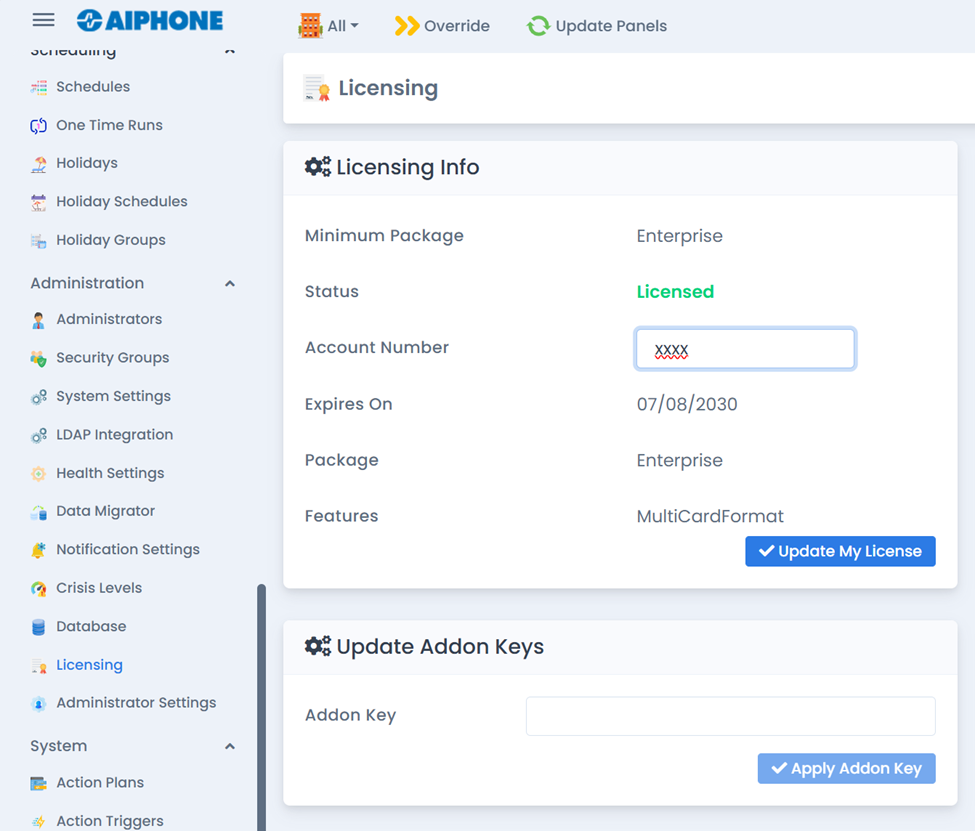
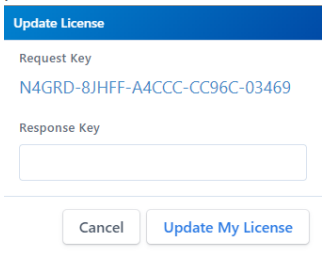
This will display a Request Key. Copy and paste it into the menu in AiphoneCloud.
Click Continue to Payment in the bottom right corner of the screen. Complete the payment process, either by using a payment method or entering a license key. This will generate a Response Key. Navigate back to the AC Nio software and paste it, then click Update My License.
With this, the license will have been fully moved from the old portal to AiphoneCloud, and can be managed from there going forward.